> ## Documentation Index
> Fetch the complete documentation index at: https://docs.uptrain.ai/llms.txt
> Use this file to discover all available pages before exploring further.
# Custom Python Evals
> Write your own custom Python evaluations using UpTrain
UpTrain offers a multitude of [pre-built evaluations](https://docs.uptrain.ai/predefined-evaluations/overview) that use custom prompt templates to evaluate your model's performance.
These checks include multiple use cases covering (respose quality, tonality, context awareness, code related evaluations and a lot more...)
You can also create your own custom prompt templates for evaluations, you can check out the [Custom Prompt Evals Tutorial](https://github.com/uptrain-ai/uptrain/blob/main/examples/checks/custom/custom_prompt_evals.ipynb).
All of these evaluations involve making LLM calls. This is not always necessary. Some evaluations can be done with simple Python code, for example:
* Check for the total number of distinct words
* Check for the average number of unique words
* Check for the presence of "numbers"
You can of course make an LLM call for that, but why to spend money when you can directly code the checks for that.
In this tutorial, we will show you how to create such custom evaluations using Python code.
Install UpTrain by running the following command:
```bash theme={null}
pip install uptrain
```
We will use UpTrain to check for these custom evaluations over the following cases:
* Check for the average number of unique words
* Check for average length of words
First, let's import the required dependencies
```python theme={null}
from uptrain import EvalLLM, Settings
from uptrain.operators.base import ColumnOp, register_custom_op, TYPE_TABLE_OUTPUT
import polars as pl
```
**Example 1:** Check for the average number of unique words
> **Note:** Please ensure to add the prefix "score\_" to the value in `col_out_score` if you wish to log these results on uptrain's locally hosted dashboard
```python theme={null}
@register_custom_op
class DiverseVocabularyEval(ColumnOp):
col_in_text: str = "response"
col_out_score: str = "score_diverse_vocabulary"
def setup(self, settings: Settings):
return self
def run(self, data: pl.DataFrame) -> TYPE_TABLE_OUTPUT:
scores = data.get_column(self.col_in_text).map_elements(lambda s : round(len(set(s.split())) / len(s.split()), 2))
return {"output": data.with_columns([scores.alias(self.col_out_score)])}
```
**Example 2:** Check for average length of words
```python theme={null}
@register_custom_op
class AverageWordLengthEval(ColumnOp):
col_in_text: str = "response"
col_out_score: str = "score_average_word_length"
def setup(self, settings: Settings):
return self
def run(self, data: pl.DataFrame) -> TYPE_TABLE_OUTPUT:
scores = data.get_column(self.col_in_text).map_elements(lambda s : round(sum(map(lambda word: len(word), s.split())) / len(s.split()), 2))
return {"output": data.with_columns([scores.alias(self.col_out_score)])}
```
Let's define a dataset
```python theme={null}
data = [
{
"question": "What are the primary components of a cell?",
"response": "A cell comprises a cell membrane, cytoplasm, and nucleus. The cell membrane regulates substance passage, the cytoplasm contains organelles, and the nucleus houses genetic material."
},
{
"question": "How does photosynthesis work?",
"response": "Photosynthesis converts light energy into chemical energy in plants, algae, and some bacteria. Chlorophyll absorbs sunlight, synthesizing glucose from carbon dioxide and water, with oxygen released as a byproduct."
},
{
"question": "What are the key features of the Python programming language?",
"response": "Python is a high-level, interpreted language known for readability. It supports object-oriented, imperative, and functional programming with a large standard library, dynamic typing, and automatic memory management."
}
]
```
All done! Now let's run these evaluations
```python theme={null}
eval_llm = EvalLLM(Settings())
results = eval_llm.evaluate(
project_name = 'UpTrain',
data=data,
checks=[
DiverseVocabularyEval(col_in_text="response"),
AverageWordLengthEval(col_in_text="response"),
],
)
```
> **Note:** By default UpTrain runs locally on your system. You can also ensure this by passing `Settings(evaluate_locally=True)` to EvalLLM
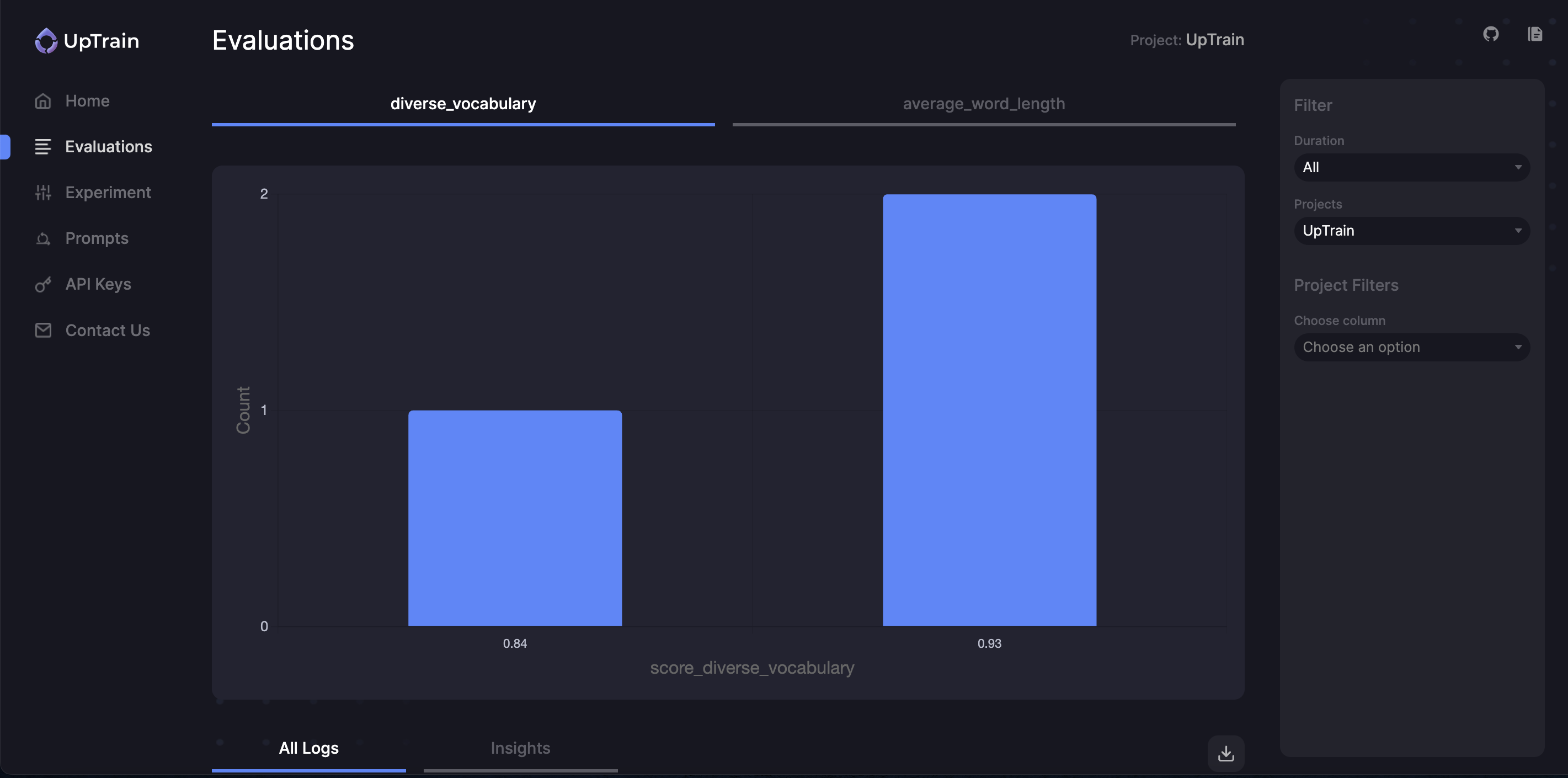
Now that you have generated these evaluations, you can also visualize the results on UpTrain's Dashboard.
This Dashboard is a part of UpTrain's open-source offering and runs locally on your device.
Check out this [documentation](https://docs.uptrain.ai/dashboard/getting_started) to get started with UpTrain Dashboard
### Bonus
We have already defined some prebuilt evaluations that you can use without the hassle of writing the code for them
| Operator | Description | Input | Output |
| ------------------- | ---------------------------------------------- | --------------------- | ------------------- |
| `DocsLinkVersion()` | Extracts version numbers from URLs in response | `response` | `docs_link_version` |
| `WordCount()` | Calculate the number of words in response | `response` | `word_count` |
| `TextLength()` | Calculate the length of text in response | `response` | `text_length` |
| `KeywordDetector()` | Detects the presence of a keyword in response | `response`, `keyword` | `keyword_detector` |
```python theme={null}
from uptrain.operators.language.text import WordCount, KeywordDetector
eval_llm = EvalLLM(Settings())
results = eval_llm.evaluate(
project_name = 'UpTrain',
data=data,
checks=[
WordCount(col_in_text = "response"),
KeywordDetector(col_in_text = "response", keyword = 'Python'),
],
)
```
> **Note:** If you face any difficulties, need some help with using UpTrain or want to brainstorm on custom evaluations for your use-case, [speak to the maintainers of UpTrain here](https://calendly.com/uptrain-sourabh/30min).
Open this tutorial in GitHub
Join our community for any questions or requests