> ## Documentation Index
> Fetch the complete documentation index at: https://docs.uptrain.ai/llms.txt
> Use this file to discover all available pages before exploring further.
# Helicone
[Helicone](https://www.helicone.ai/) helps you understand how your application is performing with its monitoring tools.
We will walk you through the use of Helicone for monitoring and log your UpTrain evaluations in Helicone Dashboards
## How to integrate?
### Prerequisites
```python theme={null}
%pip install openai uptrain -qU
```
You can get your Helicone API key [here](https://www.helicone.ai/developer) and OpenAI API key [here](https://platform.openai.com/api-keys)
```python theme={null}
import os
HELICONE_API_KEY = os.environ["HELICONE_API_KEY"]
OPENAI_API_KEY = os.environ["OPENAI_API_KEY"]
```
```python theme={null}
import os
from openai import OpenAI
import uuid
import requests
update_headers = {
'Authorization': f'Bearer {HELICONE_API_KEY}',
'Content-Type': 'application/json',
}
client = OpenAI(
api_key=OPENAI_API_KEY, # Replace with your OpenAI API key
base_url="http://oai.hconeai.com/v1", # Set the API endpoint
default_headers= { # Optionally set default headers or set per request (see below)
"Helicone-Auth": f"Bearer {HELICONE_API_KEY}",
}
)
```
```python theme={null}
data = [
{
"question": "What causes diabetes?",
"context": "Diabetes is a metabolic disorder characterized by high blood sugar levels. It is primarily caused by a combination of genetic and environmental factors, including obesity and lack of physical activity.",
},
{
"question": "What is the capital of France?",
"context": "Paris is the capital of France. It is a place where people speak French and enjoy baguettes. I once heard that the Eiffel Tower was built by aliens, but don\'t quote me on that.",
},
{
"question": "How is pneumonia treated?",
"context": "Pneumonia is an infection that inflames the air sacs in one or both lungs. It is typically treated with antibiotics, rest, and supportive care. The choice of antibiotics depends on the type of pneumonia and its severity.",
}
]
```
```python theme={null}
def create_prompt(question, context):
prompt = f"""
Context information is below.
---------------------
{context}
---------------------
Given the context information and not prior knowledge, answer the query.
Query: {question}
Answer:
"""
return prompt
```
```python theme={null}
def generate_responses(prompt):
response = client.chat.completions.create(
model="gpt-4",
messages=[
{"role": "user", "content": prompt}
],
extra_headers={ # Can also attach headers per request
"Helicone-Auth": f"Bearer {HELICONE_API_KEY}",
"Helicone-Request-Id": f"{my_helicone_request_id}"
},
).choices[0].message.content
return response
```
```python theme={null}
from uptrain import EvalLLM, Evals, ResponseMatching
eval_llm = EvalLLM(openai_api_key = OPENAI_API_KEY)
```
We have used the following 5 metrics from UpTrain's library:
1. [Response Conciseness](https://docs.uptrain.ai/predefined-evaluations/response-quality/response-conciseness): Evaluates how concise the generated response is or if it has any additional irrelevant information for the question asked.
2. [Factual Accuracy](https://docs.uptrain.ai/predefined-evaluations/context-awareness/factual-accuracy): Evaluates whether the response generated is factually correct and grounded by the provided context.
3. [Context Utilization](https://docs.uptrain.ai/predefined-evaluations/context-awareness/context-utilization): Evaluates how complete the generated response is for the question specified given the information provided in the context. Also known as Reponse Completeness wrt context
4. [Response Relevance](https://docs.uptrain.ai/predefined-evaluations/response-quality/response-relevance): Evaluates how relevant the generated response was to the question specified.
Each score has a value between 0 and 1.
You can look at the complete list of UpTrain's supported metrics [here](https://docs.uptrain.ai/predefined-evaluations/overview)
```python theme={null}
def uptrain_evaluate(item):
res = eval_llm.evaluate(
project_name = "Helicone-Demo",
data = item,
checks = [
Evals.RESPONSE_CONCISENESS,
Evals.RESPONSE_RELEVANCE,
Evals.RESPONSE_COMPLETENESS_WRT_CONTEXT,
Evals.FACTUAL_ACCURACY,
]
)
return res
```
```python theme={null}
results = []
for index in range(len(data)):
question = data[index]['question']
context = data[index]['context']
prompt = create_prompt(question, context)
my_helicone_request_id = str(uuid.uuid4())
response = generate_responses(prompt)
eval_data = [
{
'question': question,
'context': context,
'response': response,
}
]
result = uptrain_evaluate(eval_data)
results.append(result)
for i in result[0].keys():
if i.startswith('score') or i.startswith('explanation'):
json_data = {
'key': i,
'value': str(result[0][i]),
}
status = requests.put(f'https://api.hconeai.com/v1/request/{my_helicone_request_id}/property', headers=update_headers, json=json_data)
```
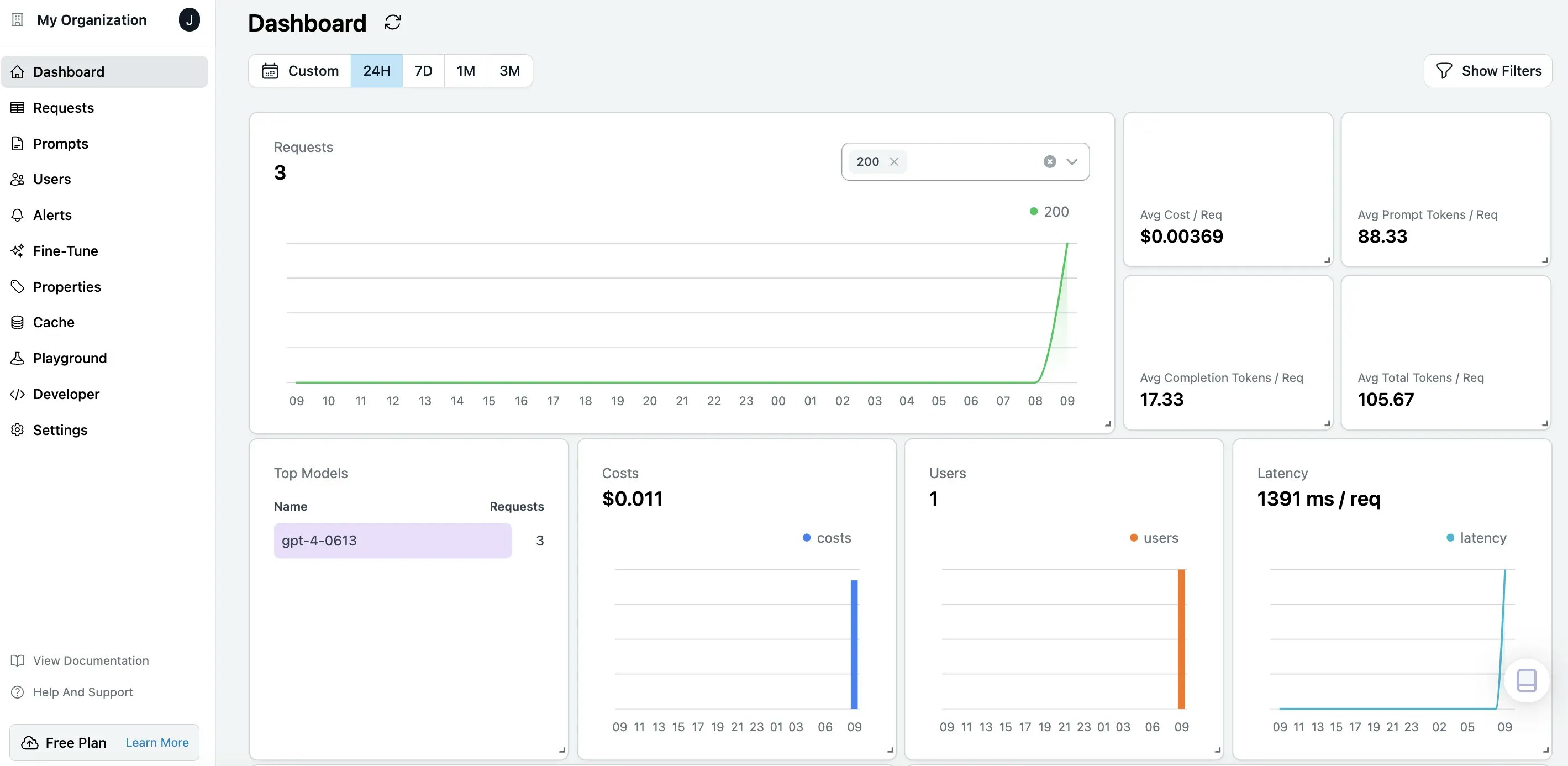
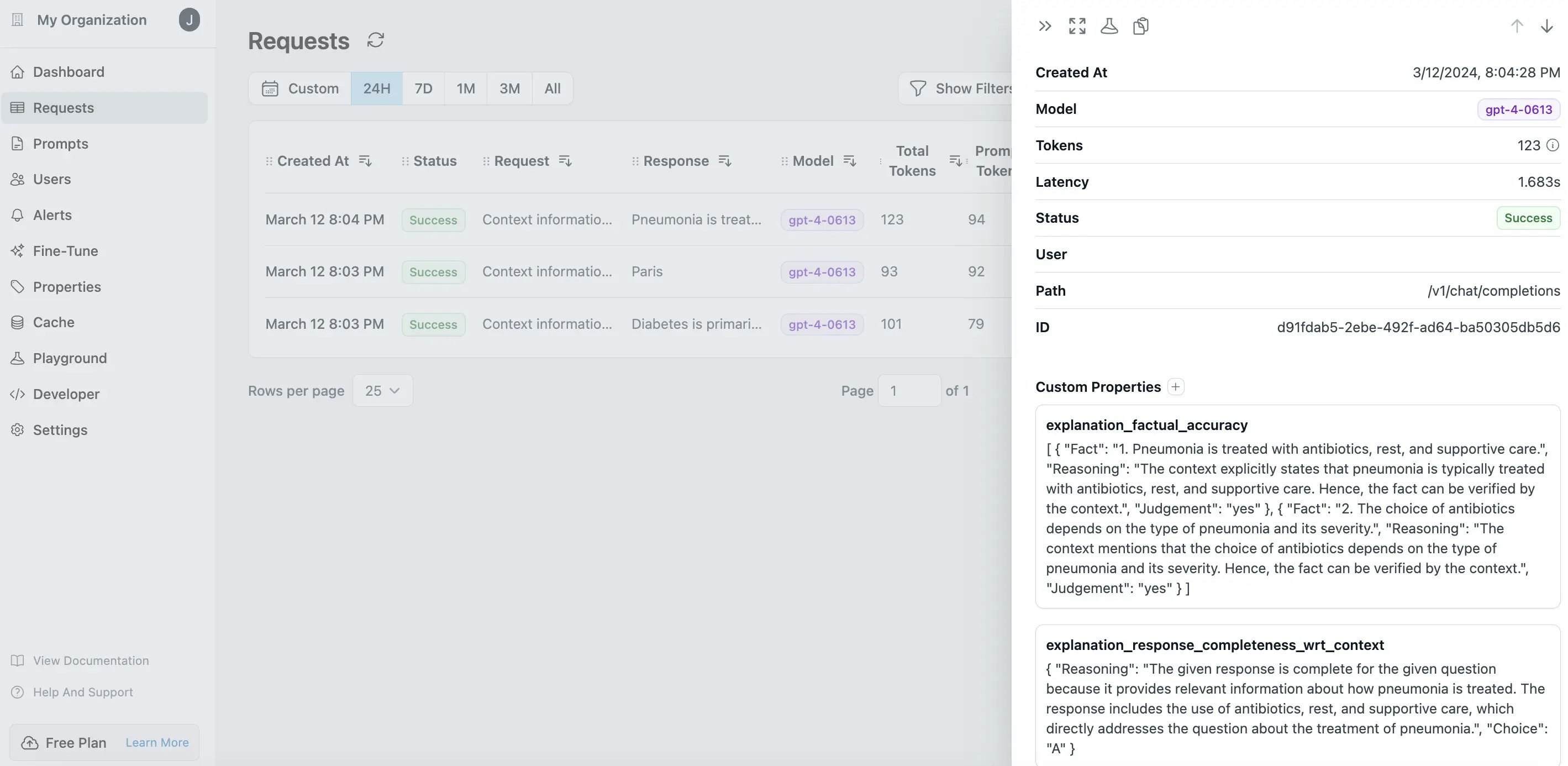
### Visualize Results in Helicone Dashboards
You can log into [Helicone Dashoards](https://www.helicone.ai/dashboard) to observe your LLM applications over cost, tokens, latency
 You can also look at individual records
 Open this tutorial in GitHub
Join our community for any questions or requests
Open this tutorial in GitHub
Join our community for any questions or requests